Hi guys, today I'm inspired :) Rasvan already knows me ahaha..
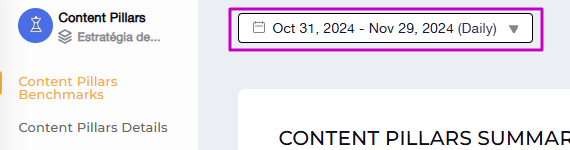
I've been noticing that at times when I use the tool, when I want to change to a certain period, it doesn't give me the option to edit, it seems like the calendar is blocked, which makes me go back to the tool's home page andfilterfrom the first page, so that I can continue thinking about the tool with the chosen period.
I did the test likein the print, when I accessed the content pillars page, it doesn't let me change the date, if I click, nothing happens, then I go back to the beginning just to change the date and go back to searching for data.
Would you know if other users or you would notice this problem too?
This issue has been fixed. Let me know if you are still having this problem.
Diana
Team•
Dec 5, 2024
Oh, I found a similar use case for this issue - when I accessed the content pillars page after the Brand page. It's likely related to the numerous changes we've implemented recently. I've already shared this with our team, and I'm confident they'll come up with a solution that will make everything work smoothly for you! 🫶 I’ll get back to you with an update:)
Comments2
Diana
Dec 17, 2024
This issue has been fixed. Let me know if you are still having this problem.
Diana
Dec 5, 2024
Oh, I found a similar use case for this issue - when I accessed the content pillars page after the Brand page. It's likely related to the numerous changes we've implemented recently. I've already shared this with our team, and I'm confident they'll come up with a solution that will make everything work smoothly for you! 🫶 I’ll get back to you with an update:)